 Developer & ops workbench
Opsdeck
One deck for CI failures, cron, traces, k8s events, API diffs, query plans and Terraform.
Opsdeck is an incident and change workbench that runs in your browser. Paste CI logs, crontabs, distributed traces, Kubernetes events, two OpenAPI versions, query plans, Lambda REPORT lines, Terraform plans, error messages and suspicious strings; Opsdeck recognises each format, masks secrets locally and sends it to the matching usefulweb tool. The results become one ranked list of findings with triage, a release gate with go/no-go rules, A/B and over-time comparisons, a merged timeline, action items with business-day due dates, a fair review meeting across time zones and one printable report.

Screenshots
- Dashboard: findings, gate and analyses
 Evidence with findings and the full tool result
 Release gate: go/no-go rules
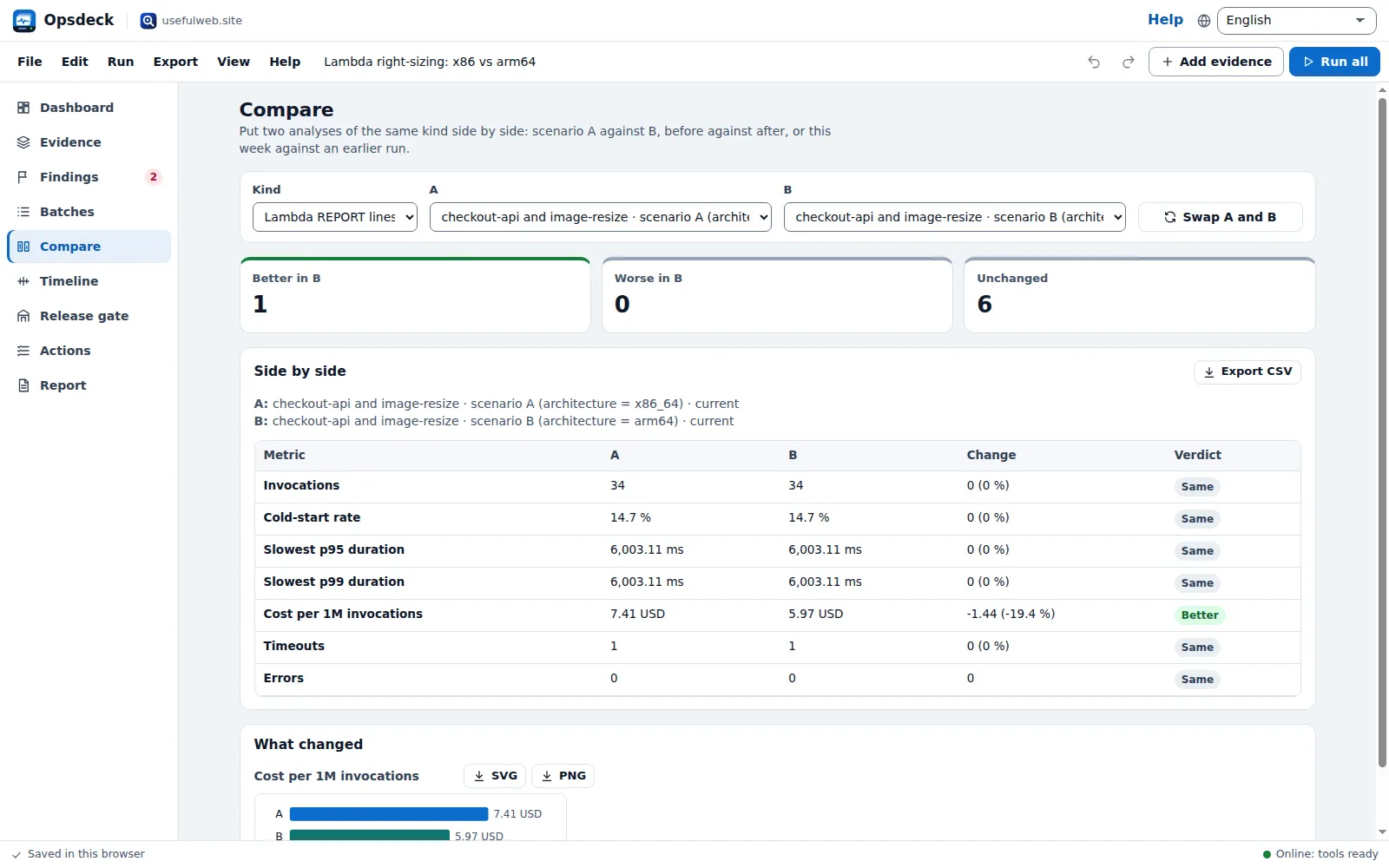 Scenario A/B side by side
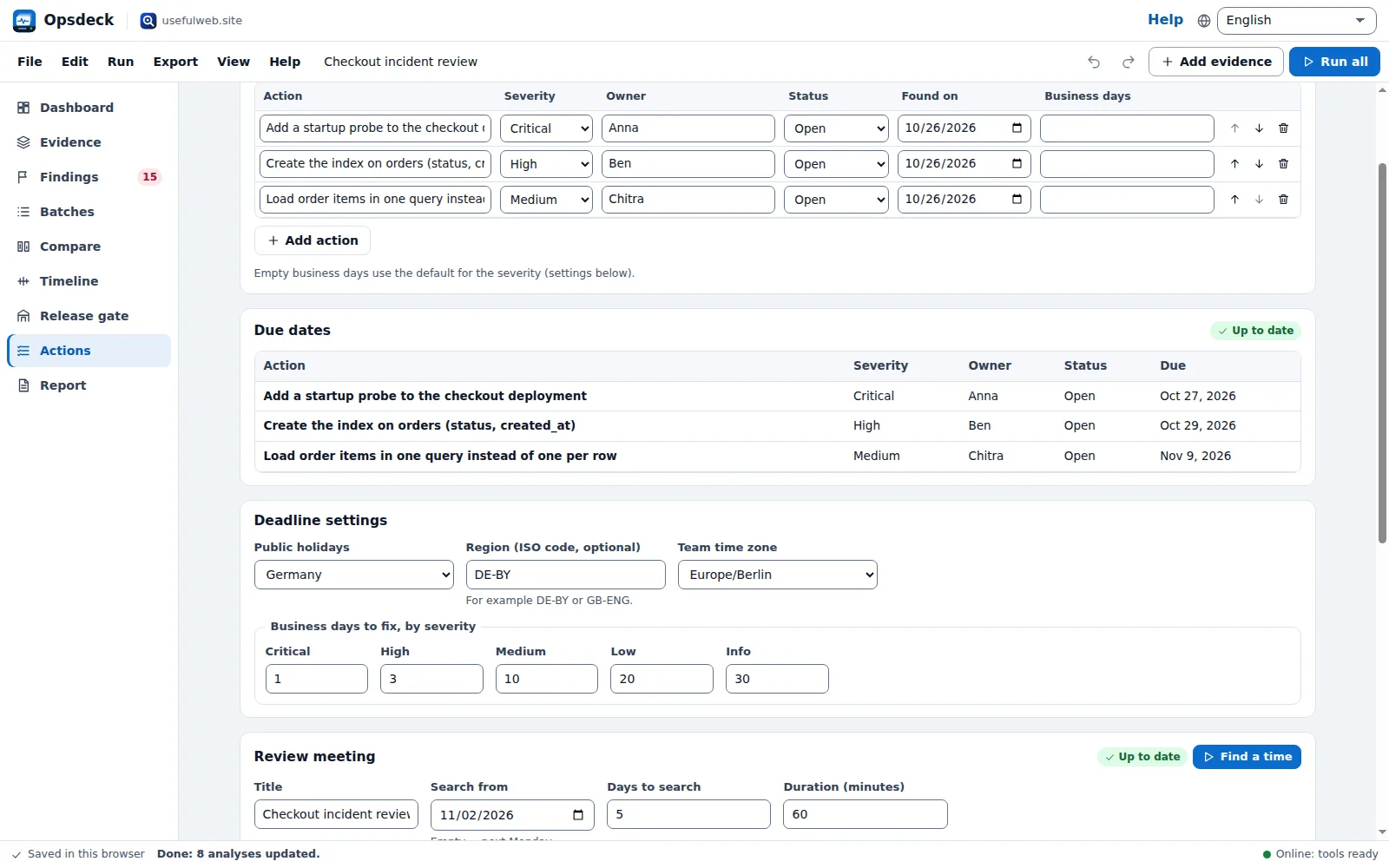 Actions, due dates and the review meeting
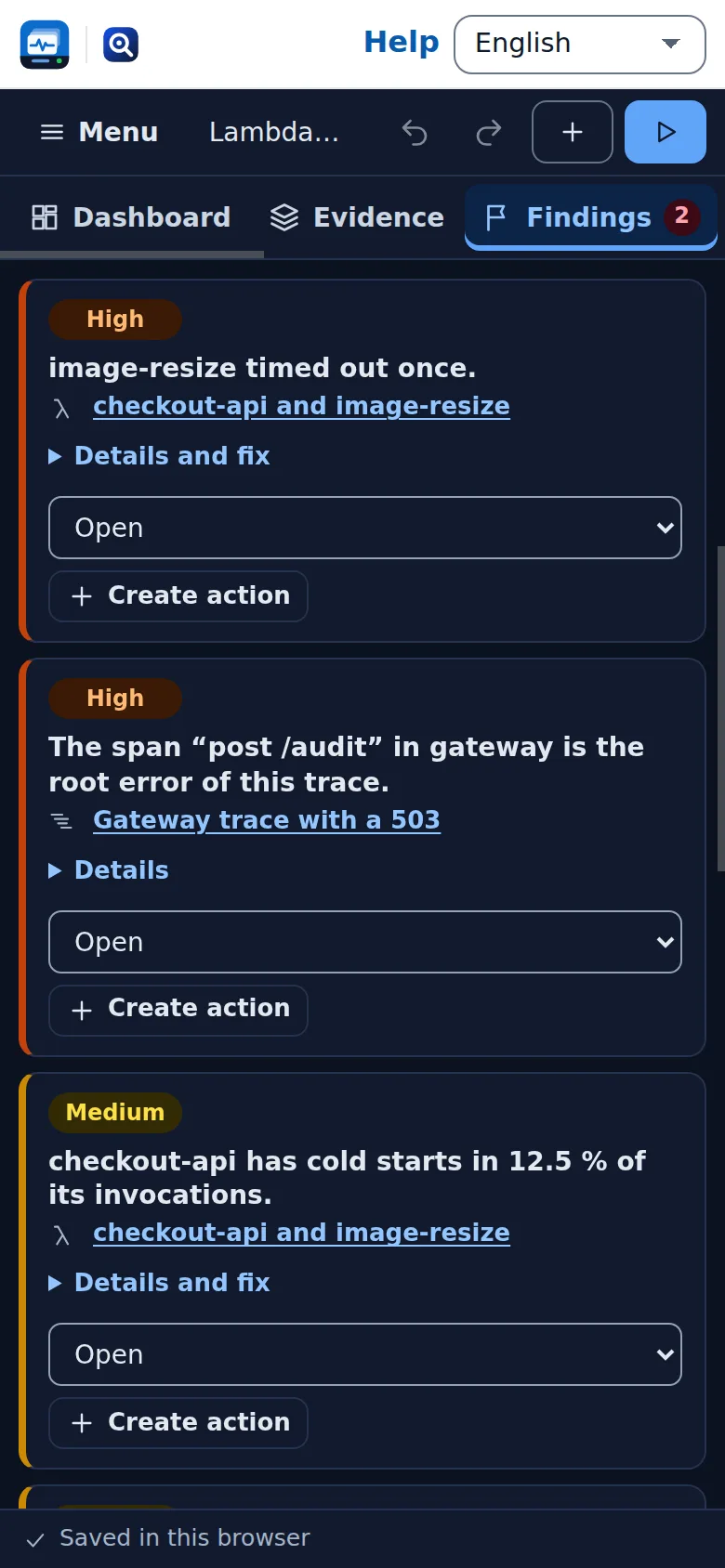 Phone layout and dark theme
Features
Paste anything, Opsdeck sorts it
CI logs, crontabs, OTLP/Jaeger/Zipkin traces, kubectl events, OpenAPI specs, EXPLAIN output, Lambda REPORT lines, Terraform JSON, SQL, errors and encoded values are recognised and routed to the right tool.
One ranked list of findings
Root causes, crash loops, N+1 calls, breaking API changes, disk-spilling sorts, risky Terraform replacements and world-writable files from every tool, ranked by severity, with triage status and fixes.
Release gate
Go/no-go rules over the results — no breaking changes, no critical Terraform changes, CI failure rate under a limit, open critical findings at zero — with the worst evidence named for every failing rule.
Scenario A/B
Run the same evidence with other options side by side: Lambda costs on x86_64 against arm64, a crontab in Berlin against UTC across the DST night, plans with another estimate threshold.
Comparisons over time
Every run keeps its key metrics. Paste this week’s CI logs or a new plan into the same item and compare failure rate, p95, execution time or drift with earlier runs, with sparklines.
Merged timeline
CI runs, Kubernetes events, cron runs and job history from all tools on one time axis, with capture times and action due dates, filterable by source and problems.
Batch triage
Run one tool over many rows: error lines grouped by cause, ls -l output checked for world-writable files and setuid programs, strings checked for look-alikes and Trojan Source, packages and domains looked up.
Actions with real due dates
Turn findings into actions. RuleDate counts business days per severity with the public holidays of your country and region, and the calendar file adds a reminder before each due date.
Fair review meeting
TimeFair finds the best time for the incident review across everyone’s time zone and working hours, DST included, and the slot goes into the same calendar file.
Secrets masked before sending
Tokens, keys, JWTs, passwords in URLs or config lines and e-mail addresses are masked in your browser before a text is sent. Preview exactly what leaves the browser for every item.
Full tool results inside
Every table, chart, timeline, dependency graph and code block the tools return is shown in the workspace; charts and graphs export as SVG or PNG.
Consolidated report
Verdict, open findings, key metrics per evidence, actions and the meeting in one report to print or save as PDF, as Markdown, or as CSV and JSON for scripts.
Local-first and offline
Autosave and recent decks in your browser, project files, undo and redo, share links and Google Drive. Results are stored with the deck, so everything stays readable offline.
App Bridge, API and MCP
Send findings as a table, the report as text and the results as JSON to other premium apps; import text, JSON and tables as evidence. Every tool is also available through the JSON API and MCP.


Templates
Start from a ready-made project and change it to fit.
Checkout incident review
Failing CI runs, a crash-looping checkout deployment, a slow order page trace, a disk-spilling query and the errors from the logs — one deck with ranked findings, actions and a review meeting.
Release gate: API and infrastructure
Two OpenAPI version pairs, two Terraform plans and the dbt lineage behind a revenue report, checked against go/no-go rules before a release.
Nightly jobs and the DST weekend
A crontab with run history, the fall-back night in Berlin compared with a UTC server, and an audit of script and directory permissions.
Lambda right-sizing: x86 vs arm64
CloudWatch REPORT lines analysed twice — on x86_64 and on arm64 — plus a second function export and a gateway trace with a 503.
Suspicious strings and encoded payloads
Look-alike domains, a Trojan Source line, encoded payloads from a log and a dependency check — single items and batches.
Built-in tools
Opsdeck uses these tools. Each one also has its own page and works on its own, in the browser, through the JSON API and through MCP.
- CI/CD Failure ExplorerPaste CI logs from several runs: root cause per run, grouped signatures, top causes and fixes.
- Kubernetes Event ExplorerPaste kubectl events and get a timeline, reason taxonomy and likely root causes per workload.
- Distributed Trace ExplorerPaste an OTLP, Jaeger or Zipkin trace: span tree, critical path, self-time, N+1 calls and errors.
- Error Message TranslatorPaste a technical error and get the plain-English cause and troubleshooting steps.
- Query Plan VisualizerPostgreSQL EXPLAIN (ANALYZE) or MySQL EXPLAIN JSON → plan tree, hot nodes and index suggestions.
- Serverless Performance ExplorerLambda REPORT lines → cold-start rate, p50/p95/p99, memory right-sizing and cost per 1M calls.
- OpenAPI Diff ExplorerCompare two versions of an OpenAPI spec and see exactly which changes break clients.
- API Explorer of ExplorersSearch 2,500+ public APIs or summarise any OpenAPI spec: servers, auth, endpoints, changes.
- Terraform Plan & Drift ExplorerPaste terraform show -json: drift, replacement reasons, attribute diffs and risky deletes.
- Data Lineage ExplorerPaste SQL or dbt models: table lineage graph, column lineage and upstream/downstream of any field.
- Cron Job ExplorerPaste a crontab or CronJob YAML: plain-English schedules, DST-exact next runs, herds and overlaps.
- Unicode InspectorEvery code point with name, script and bytes, plus hidden characters and look-alikes.
- CyberChef-lite PipelineOne-click decoding recipes: JWT, base64 → gunzip → JSON, double URL decode, hex dump.
- Unix Permission Calculatorchmod calculator: octal ↔ rwx, setuid/sticky, u+x style changes, umask and ls -l.
- Explorer of EverythingSearch transactions, contracts, domains, packages, advisories, MCP servers and websites in one box.
- FileFitCan this app open, edit or convert that file format? Verified facts with sources.
- RuleDate Deadline CalculatorBusiness-day and deadline maths with public holidays and a step-by-step rule trace.
- TimeFair Meeting PlannerFind fair meeting times across time zones, with DST-exact local times and rotation.
For AI agents
Opsdeck runs on a deterministic engine. The same functions are available as tools with a JSON API and MCP, so scripts and AI agents get exactly the results the app shows.
- CI/CD Failure Explorer – Paste CI logs from several runs: root cause per run, grouped signatures, top causes and fixes.
Tool page ·POST https://opsdeck.usefulweb.app/api/v1/tools/cicd-failure-explorer/calculate· MCPcicd_failure_explorer - Kubernetes Event Explorer – Paste kubectl events and get a timeline, reason taxonomy and likely root causes per workload.
Tool page ·POST https://opsdeck.usefulweb.app/api/v1/tools/kubernetes-event-explorer/calculate· MCPkubernetes_event_explorer - Distributed Trace Explorer – Paste an OTLP, Jaeger or Zipkin trace: span tree, critical path, self-time, N+1 calls and errors.
Tool page ·POST https://opsdeck.usefulweb.app/api/v1/tools/distributed-trace-explorer/calculate· MCPdistributed_trace_explorer - Error Message Translator – Paste a technical error and get the plain-English cause and troubleshooting steps.
Tool page ·POST https://opsdeck.usefulweb.app/api/v1/tools/error-message-translator/calculate· MCPerror_message_translator - Query Plan Visualizer – PostgreSQL EXPLAIN (ANALYZE) or MySQL EXPLAIN JSON → plan tree, hot nodes and index suggestions.
Tool page ·POST https://opsdeck.usefulweb.app/api/v1/tools/query-plan-visualizer/calculate· MCPquery_plan_visualizer - Serverless Performance Explorer – Lambda REPORT lines → cold-start rate, p50/p95/p99, memory right-sizing and cost per 1M calls.
Tool page ·POST https://opsdeck.usefulweb.app/api/v1/tools/serverless-performance-explorer/calculate· MCPserverless_performance_explorer - OpenAPI Diff Explorer – Compare two versions of an OpenAPI spec and see exactly which changes break clients.
Tool page ·POST https://opsdeck.usefulweb.app/api/v1/tools/openapi-diff-explorer/calculate· MCPopenapi_diff_explorer - API Explorer of Explorers – Search 2,500+ public APIs or summarise any OpenAPI spec: servers, auth, endpoints, changes.
Tool page ·POST https://opsdeck.usefulweb.app/api/v1/tools/api-explorer-of-explorers/calculate· MCPapi_explorer_of_explorers - Terraform Plan & Drift Explorer – Paste terraform show -json: drift, replacement reasons, attribute diffs and risky deletes.
Tool page ·POST https://opsdeck.usefulweb.app/api/v1/tools/terraform-drift-explorer/calculate· MCPterraform_drift_explorer - Data Lineage Explorer – Paste SQL or dbt models: table lineage graph, column lineage and upstream/downstream of any field.
Tool page ·POST https://opsdeck.usefulweb.app/api/v1/tools/data-lineage-explorer/calculate· MCPdata_lineage_explorer - Cron Job Explorer – Paste a crontab or CronJob YAML: plain-English schedules, DST-exact next runs, herds and overlaps.
Tool page ·POST https://opsdeck.usefulweb.app/api/v1/tools/cron-job-explorer/calculate· MCPcron_job_explorer - Unicode Inspector – Every code point with name, script and bytes, plus hidden characters and look-alikes.
Tool page ·POST https://opsdeck.usefulweb.app/api/v1/tools/unicode-inspector/calculate· MCPunicode_inspector - CyberChef-lite Pipeline – One-click decoding recipes: JWT, base64 → gunzip → JSON, double URL decode, hex dump.
Tool page ·POST https://opsdeck.usefulweb.app/api/v1/tools/cyberchef-lite-pipeline/calculate· MCPcyberchef_lite_pipeline - Unix Permission Calculator – chmod calculator: octal ↔ rwx, setuid/sticky, u+x style changes, umask and ls -l.
Tool page ·POST https://opsdeck.usefulweb.app/api/v1/tools/unix-permission-calculator/calculate· MCPunix_permission_calculator - Explorer of Everything – Search transactions, contracts, domains, packages, advisories, MCP servers and websites in one box.
Tool page ·POST https://opsdeck.usefulweb.app/api/v1/tools/explore/calculate· MCPexplore - FileFit – Can this app open, edit or convert that file format? Verified facts with sources.
Tool page ·POST https://opsdeck.usefulweb.app/api/v1/tools/filefit/calculate· MCPfilefit - RuleDate Deadline Calculator – Business-day and deadline maths with public holidays and a step-by-step rule trace.
Tool page ·POST https://opsdeck.usefulweb.app/api/v1/tools/ruledate/calculate· MCPruledate - TimeFair Meeting Planner – Find fair meeting times across time zones, with DST-exact local times and rotation.
Tool page ·POST https://opsdeck.usefulweb.app/api/v1/tools/timefair/calculate· MCPtimefair
- MCP endpoint (Streamable HTTP):
https://opsdeck.usefulweb.app/mcp - Project file format (JSON Schema): https://opsdeck.usefulweb.app/project.schema.json
- OpenAPI description: /openapi.json · llms.txt · API & MCP
Build a project through the API, then open it in the app with a link to https://opsdeck.usefulweb.app/app#project=<base64url JSON>.
Import & export
Import
- Opsdeck project (.opsdeck.json)
- Pasted or loaded text: CI logs, crontabs, traces (OTLP/Jaeger/Zipkin JSON), kubectl events, OpenAPI JSON/YAML, EXPLAIN output, Lambda REPORT lines or CSV, Terraform JSON, SQL
- Tables (CSV/TSV) as batches or Lambda data
- Project link (#project=…)
- App Bridge: text, JSON and tables from other apps
Export
- Opsdeck project (.opsdeck.json)
- Report (print/PDF and Markdown)
- Calendar (.ics) with due dates, reminders and the review meeting
- Findings, actions, timeline and comparisons (CSV)
- Results digest (JSON)
- Charts and dependency graphs (SVG and PNG)
- App Bridge: findings table, report text and results JSON to other apps
Keyboard shortcuts
| Keys | Action |
|---|---|
| Ctrl + S | Save project file |
| Ctrl + O | Open project file |
| Ctrl + Z | Undo |
| Ctrl + Y | Redo |
| Ctrl + Enter | Run the current item or section |
| Ctrl + Shift + Enter | Run all |
| 1 … 9 | Go to a section (Dashboard … Report) |
| N | Add evidence |
| ? | Keyboard shortcuts |
| Esc | Close dialog or menu; cancel a running batch |
Frequently asked questions
Is Opsdeck free, and do I need an account?
Opsdeck is free and needs no account. Your deck is saved in this browser automatically; you can also save it as a .opsdeck.json file or, when signed in with Google Drive connected, to your Drive.
What is sent to the server?
Only the text and options of the item you run, sent to the one tool that analyses it. With masking on (the default for logs, events, plans, specs and Terraform), tokens, keys, passwords and e-mail addresses are replaced in your browser first; “Preview what is sent” shows the exact text. The deck as a whole is never uploaded.
Does Opsdeck connect to my CI, cluster, database or cloud?
No. The tools read what you paste: a log, an event list, an EXPLAIN output, a plan file. Opsdeck never asks for credentials. Only lookups (domains, packages, advisories, addresses) query public sources.
How does the release gate decide?
Each rule tests one metric — for example breaking API changes, critical-risk Terraform changes, the CI failure rate or open critical findings — against a limit. Over several evidence items of the same kind the worst value counts. The gate says Go only when every active rule has a result and passes.
What is scenario B?
The same evidence analysed with other options, for example Lambda costs on arm64 instead of x86_64, or a crontab in UTC instead of Europe/Berlin. Opsdeck runs both and the Compare section shows every key metric side by side with which side is better.
How are due dates calculated?
Each action gets a number of business days — its own or the default for its severity — and RuleDate counts them from the day the finding was found, skipping weekends and the public holidays of the country and region you choose.
Does Opsdeck work offline?
Editing, findings, the gate, comparisons, the timeline, the report and every stored result work offline. Running a tool needs a connection; Opsdeck says so and keeps your inputs until you run again.
Can an AI agent or a script use Opsdeck?
Yes. The project format is published as a JSON schema at /project.schema.json, and all eighteen tools are available through the JSON API, OpenAPI and MCP on the Opsdeck host. A script can build a deck and open it in the app with a #project= link.
Limitations
What Opsdeck does not do (yet):
- Opsdeck analyses what you paste; it does not pull logs, events or plans from your systems, and it does not watch them continuously.
- Findings come from the tools’ published rules and patterns; an unusual log format or a rare error can be missed or classified as unknown.
- Masking catches common secret formats (tokens, keys, JWTs, password assignments, URL credentials, e-mail addresses); check the preview before sending sensitive logs.
- Running tools needs an internet connection; the tools are rate limited, so long batches run one item after another with short pauses.
- Each batch runs at most 60 items; a deck holds up to 40 evidence items and 12 batches.
- Share links contain the evidence text as pasted (masking only applies when sending to a tool) and no results; very large decks need a project file instead.
- Reminders in the calendar file are suggestions for your calendar app; Opsdeck itself sends no notifications.
- There is no shared live editing; share a link or a project file instead.
Tutorials
Learn Opsdeck step by step.
- Your first incident deck in ten minutesOpen the checkout incident template, press Run all, and read the dashboard, the ranked findings and the release gate. No account, nothing to install.Beginner 10 min
- Paste evidence and mask secretsAdd logs, events, traces, plans and specs, let Opsdeck recognise the format, check what is sent to the tool, and read the full tool result with its charts.Beginner 8 min
- Release gate: go or no-goTurn tool results into go/no-go rules — no breaking API changes, no critical Terraform changes, a CI failure rate under a limit — and see what blocks the release.Intermediate 8 min
- Scenarios and comparisons over timeRun the same evidence with other options (x86_64 vs arm64, Berlin vs UTC), compare two analyses side by side, and follow metrics across runs.Intermediate 9 min
- Batches: error lines, permissions and suspicious stringsRun one tool over many rows — error messages grouped by cause, ls -l output checked for world-writable files, strings checked for look-alikes and Trojan Source.Intermediate 8 min
- Actions, business-day deadlines and the review meetingTurn findings into actions, let RuleDate count business days with public holidays, export a calendar with reminders and find a fair meeting time with TimeFair.Intermediate 9 min
- Report, sharing and automationPrint or export the consolidated report, share a deck as a link or file, hand findings to other apps, and build decks with the JSON API, MCP and the project schema.Advanced 8 min
Ready to try it?
Other premium apps
-

Kerfwise
Cabinet & furniture CAD
Design cabinets and furniture, get cut lists, optimised sheet layouts, costs and drawings.
-

Kinetica
Robot motion studio
Simulate robot arms in your browser: kinematics, trajectories, collisions, program export.
-

Threadsmith
Embroidery digitizing studio
Draw or import artwork, turn it into stitches, export DST, PES, JEF or EXP files.
-

Ohmforge
Virtual electronics workbench
Draw a circuit, switch it on, and measure it with real-feeling bench instruments.
-

Twinworks
Factory digital twin & production simulation
Model a production line, simulate it and find the bottleneck — free, in your browser.
-

Agentlab
AI-agent & LLM workbench
Test an AI agent before release: permissions, traces, costs, citations and output checks.
-

Bundlekeep
Local project backup
Back up projects from every usefulweb app into one file, check it and restore any part.
-

Chainscope
Web3 investigation desk
Investigate transactions, bridges, contracts, DAOs and wallets in one case file.
-

Chartroom
Data & charts studio
Import data, chart it, run analyses and publish a report — one workspace, free.
-

Fieldday
Sports club & training organiser
Fixtures, brackets, ratings and training plans for your club — in one workspace.
-

Flipline
Drawing, storyboards & animation
A few drawings. A little life. Make a flipbook in your browser.
-

Hearth
Home & travel planner
Plan meals, chores, home care, a move and trips for your whole household in one place.
-

Keysmith
Crypto & secrets lab
Audit certificates, keys, TLS and passwords in one lab; secrets stay on your device.
-

Ledgerly
Household finance & life-admin desk
Budgets, bills, subscriptions, loans, contracts and deadlines on one private desk.
-

Lumina
Photo editor & image toolkit
Bring out what you saw. A free photo studio, right in your browser.
-

OBSCURIQ
OSINT case desk
Organize public-source research: cases, a research log, pivots and indicators.
-

Pageboard
Website inspiration boards
Collect website references, sort them with tags and arrange them on a moodboard.
-

Panelcraft
Comic books & figure references
Shape a page. Arrange a book. Give your story a voice.
-

Paperwell
Document studio: PDFs, OCR, redaction, forms & contract reading
Your paperwork in one dossier: PDF tools, OCR, redaction, forms and contract reading.
-

Proofline
Math notebook
Solve, graph, test and visualise in one notebook — with data, findings and a report.
-

Provenance
Software supply-chain security desk
SBOMs, CVEs, containers and licences in one risk register — free, in your browser.
-

RavingDesk
Paper trading workspace
Practise trading on paper: orders, ledger, risk, exposure and journal. No real money.
-

Reelcraft
Audio, video & image batch studio
Audio, video & image batch studio: cut, convert, compress, subtitle, reframe
-

Renderloom
3D scene & material studio
Shape a scene. Find its light. Keep every idea editable.
-

Signalhouse
Website & internet infrastructure inspector
Inspect DNS, TLS, mail, CDN and routing of all your domains — and see what changed.
-

Tonegrid
Tone matrix & beat sequencer
Light up squares to build looping melodies and beats, then arrange them into songs.